
The novelty phase of AI has officially passed. In 2026, it’s no longer about whether to use AI, but how to integrate it into your workflow without adding more “dashboard fatigue” to your morning.
At our web design agency, we’ve been putting some of the “top” tools to the test. Some have become indispensable daily partners; others, frankly, haven’t lived up to the marketing hype. Here is an honest look at our current AI toolkit.
For Assistance
Gemini (Google) – The All-Rounder
Gemini has become our go-to for our day-to-day assistant. It excels at handling brand tone and is particularly fast at summarising long-form content, drafting documents, and proofreading emails. We find the conversational UI feedback loops perfect for brainstorming. Its free version is really very good, virtually no limitations. Top Tip: Tweak the settings to instruct it to use UK language and not to use em-dashes! The Verdict – excellent for drafting, but of course, like all of them, it still requires human oversight.
Yoast AI – The “GEO/AIO/SEO” Specialist
Search behaviour is shifting towards Generative Engine Optimisation (GEO) and AI Overviews (AIO), with underlying SEO to support them. We have used Yoast AI specifically for generating high-quality metadata and identifying “key takeaways” on blog posts. This doesn’t just help with traditional SEO; it ensures content is structured for AI citations and summaries. Above all, it is a massive time saver. Tasks that previously took hours to draft and approve manually now take only minutes.
Otter.ai – The Meeting Memory
Otter.ai remains a good one for transcribing meetings and providing instant action points. It is highly accurate at capturing the flow of a conversation, allowing us to focus on the client rather than taking notes. We’d love to use it more, but having the ‘AI Agent’ present in meetings isn’t always appropriate.
Claude (Anthropic) – For Nuance
When a brief is complicated or an article needs a thoughtful, conversational touch, you can turn to Claude. It often handles nuance better than other models, making it ideal for longer, more sensitive editorial pieces. It’s great, but like all LLMs, it can confidently present false information, and while there is a free option, it is heavily restricted. Higher-tier plans ($100–$200/month) target power users but still face the same underlying rate-limiting logic.
Use.AI
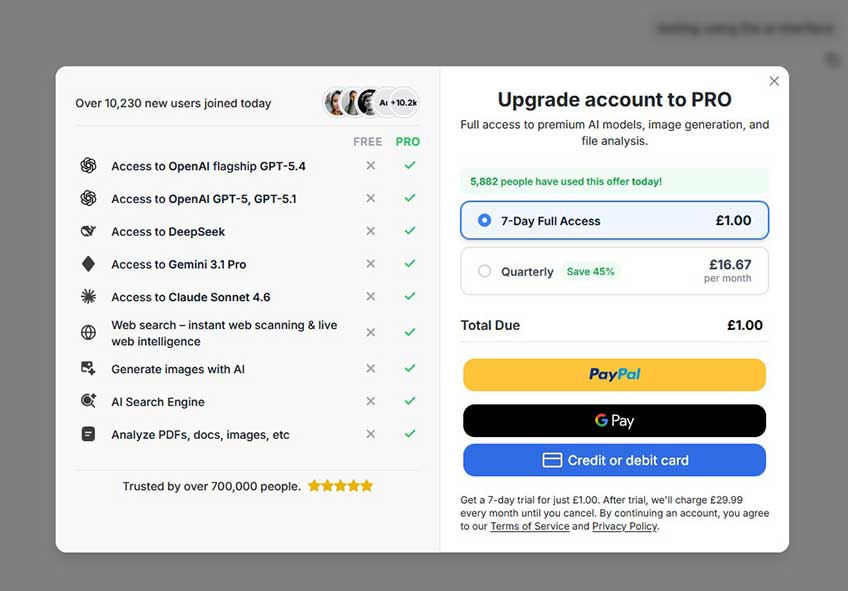
Use.AI is an all-in-one AI workspace that provides access to over 25 leading artificial intelligence models, such as GPT-5, Claude, and Gemini, through a single dashboard and subscription.
Be warned: I found their subscription experience very misleading: they offer 7-day Full Access for £1.00 – but don’t miss the small print (see below), you are actually signing up for £29.99 per month until you cancel! I would describe this as using “dark patterns”, and my Bank agreed, issuing a chargeback on the £29.99 and an hour after Use.ai refused to refund me.
ChatGPT & Co-pilot – The Sliding Scale
While these were the original leaders, they have started to slip in our opinion. We’ve found increasing issues with accuracy, being out of date and “hallucinations”. They remain useful for quick, low-stakes tasks, but they no longer hold the top spot for our critical drafting work. Of course, these may also require a premium subscription, which is a drawback for some.
Midjourney (V6+) – Visual Consistency
For campaign imagery that looks polished rather than generic, Midjourney is good. It allows you to maintain a consistent visual style across social content, provided you have a human eye to guide the prompt. To get the best results, you still need to master “slash commands” and specific parameters (e.g., --ar 16:9, --stylize, --cref). Again, a subscription is needed, especially as everything is published in the community gallery unless you go premium and go ‘stealth’, and the legal landscape for AI art in 2026 remains a grey area.

And for web design and development?
We’ve been testing some of the “top of the market” AI web builders – and there are a lot! While they are impressive as tech demos, our experience shows they aren’t quite ready to replace the professional yet… here’s why –
WordPress.com AI Website Builder – The “Chat-to-Chaos” Experience
The marketing promise is simple: “Build your site in minutes with AI” by simply having a chat. In reality, WordPress AI Builder is a fast track to a digital headache. While it technically “builds” a site in the sense that pages appear on a screen, the output is almost entirely unfit for purpose for anyone with a shred of brand identity or UX design knowledge.
We put it to the test with specific brand guidelines, and the results were, frankly, a disaster. When prompted to use a specific palette, it inexplicably ignored key brand colours, opting instead for whatever the AI felt like that day. The situation with typography was even worse; despite specifying brand fonts, it defaulted to generic alternatives, seemingly unable to fetch or implement the requested styles.
It claims to let you create a website by “chatting,” but within minutes, the experience is more likely to drive you insane than result in a functional site. It is a classic case of a tool that prioritises the “magic” of the process over the quality of the product. If you need a site that actually looks like your business, and is unique or distinctive, this is a non-starter.
The Useless Factor: Beyond the branding blunders, the AI struggles with the most basic layout logic. Ask it for a “minimalist” feel, and you might get a wall of generic stock text; ask for a “portfolio,” and it may tuck your images away in a submenu where no one can find them. It is essentially a lucky dip where you always lose.
Lovable – Fast Prototyping
Lovable is great for spinning up a quick React app or a functional prototype. However, it can get stuck in “looping” errors when things get complex, and the code it produces can be difficult for a human developer to jump in and fix.
While Lovable is built on open standards that allow for full code export via GitHub, it remains a managed environment by default. For those who choose to stay within the platform for its ease of use, there is a natural trade-off: you gain rapid, AI-driven iteration, but you become reliant on their specific ecosystem to maintain that speed. Moving the project to independent hosting is entirely possible, but doing so shifts the responsibility of maintenance and scaling back to your own technical team, removing the “magic” of the automated AI builder. A good one for ‘vibe coders‘.
ZipWP – The WordPress Shortcut
ZipWP is one of the fastest ways to get a “first draft” WordPress site. It’s useful for testing a layout, a very fast way to get started – it seems very impressive, but you may find yourself spending just as much time adapting and branding it as you would starting from scratch with a solid wireframe. It relies on predefined templates and AI-generated layouts, so the results often lack a unique visual identity. If you use it, you’ll likely find your site looks remarkably similar to thousands of others. It’s a shortcut for a layout, but you’ll spend significant time rebranding it to ensure it doesn’t feel like a generic “AI-built” site.
Framer AI – Beautiful but “Salesy”
Framer’s AI is fun for landing pages, but it tends to spit out generic, promotional copy that lacks soul. It’s a great design tool, but the AI-generated starting points often feel formulaic and require significant manual tweaking to meet real user requirements. While the designs are clean, they follow this very specific “AI-aesthetic” that can make a brand feel interchangeable with its competitors. It lacks the bespoke intuition of a human designer who understands brand personality and identity.
Crucially, Framer is a closed ecosystem with no native code export, meaning you are permanently tied to their hosting. This lack of an open-source framework creates a “walled garden” effect where you don’t truly own the underlying asset, making it difficult to migrate or customise the code independently in the future.
When it comes to compliance & security, this is the hidden hurdle. When AI generates these environments, it often overlooks regional compliance requirements (like GDPR or specific UK data privacy standards) and security best practices. Using a “black box” to build your infrastructure means you might not fully know where your data is going or how secure the underlying code actually is.
Quick Fact Check: Unlike Lovable (which syncs to GitHub), Framer is strictly proprietary. If you stop your subscription, you cannot simply download your site to host it elsewhere.
Visual Studio AI – The Developer’s Hindrance
We’ve found that even in high-end environments like Visual Studio, AI can sometimes be more of a hindrance than a help—throwing in inline code you don’t want or breaking useful features like autocomplete. It’s a reminder that AI is still a tool, not a replacement for a developer.
Final Thoughts on AI tools in 2026: Speed vs. Sovereignty
The most advanced tool isn’t always the best one, and although it can feel like a magic wand solution, it usually comes with a price of some sort. The winners are the tools that support us as strategists and do the heavy crunching without fees. We think AI has a way to go before it can match the intuition of a real designer or developer, and as many are probably finding out the hard way, there are no shortcuts to quality, human-led design and change-management workflow, security and cost.
About the Author
Karen Oliver, Managing Director
 Since 2009, Karen has directed the creative strategy and UX design vision for the agency. Clients value her unique ability to bridge the gap between high-level business goals and technical execution. With 25 years of experience across SEO, project management, and design strategy, she ensures that every digital asset – AI-assisted or otherwise – is built with purpose, precision, and long-term sovereignty in mind.